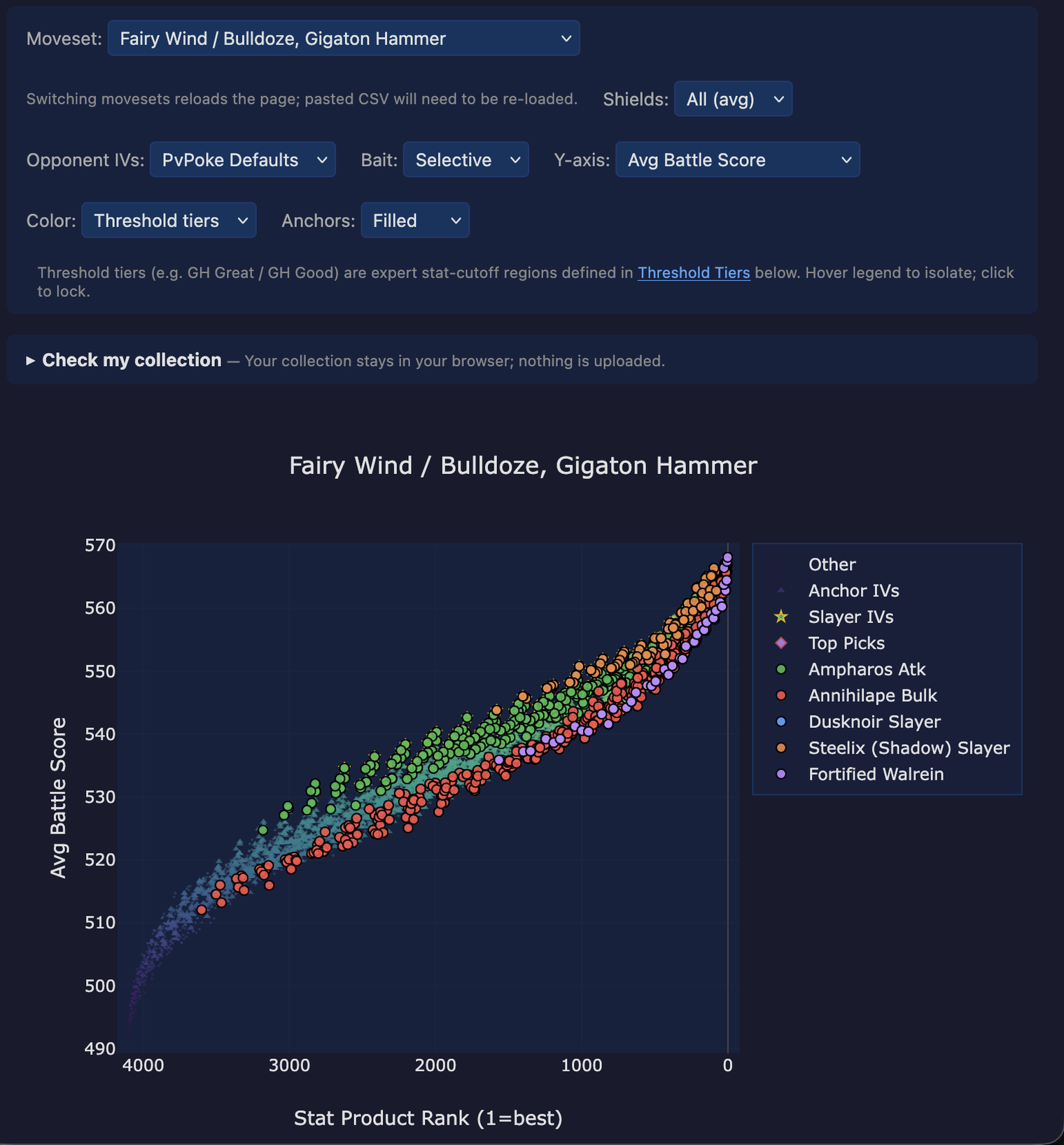
The scatter plot is the centerpiece of every dive. Each of the 4096 legal IV spreads becomes one point on the plot, positioned by stat-product rank on the x-axis and by battle outcome on the y-axis. The plot is a Plotly figure, so every point is hoverable and the legend is clickable.
It’s where you go when the tier cards and the IV Flavor Guide have narrowed things down and you want to see which specific IV spreads land where.
The y-axis responds to the Y-axis dropdown in the control strip
above the plot: average score plus three wins counts (vs PvPoke-default
opponents, vs rank-1 opponents, vs the mirror cohort). Wins are tallied
across whichever Shields selection is active - out of
78 × 9 on All (avg),
out of 78 for a single scenario. When the y-axis
is a wins count, the hover card shows “won / total” rather than an
averaged score.
The strip of dropdowns above the plot is what makes the scatter interactive. Each dropdown (bar Moveset on split dives - see below) is non-destructive: changing one re-renders the colours or y-values without rebuilding the underlying data, so flipping between views is instant.
0v0,
0v1, …, 2v2) plus All (avg). The per-scenario views narrow
the score down to one shield configuration; All (avg) is the
default and shows the pool-wide average.--opp-ivs both) -
switches opponents between PvPoke’s default IV spreads and each
opponent’s rank-1-by-stat-product IV spread. Rank-1 opponents are
marginally bulkier;
matchups on a breakpoint edge can flip across the switch.--bait both) - disables
bait-first shielding so the opponent never concedes a bait-move
shield. Useful for sanity-checking how much of the species’s score
is leaning on bait sequences.Changing any of these rebinds every other surface on the page - the Top IVs table, the per-IV hover card, the anchor-clear bullet lists - so the whole page stays consistent with whichever slice of the dive you’re currently looking at.
Every dive overlays a band of Anchor IVs on the plot - a reference
set of IVs (the anchor-clear set: every spread that passes at least
one selective named anchor - the same set the hover card’s Clears:
line reads) that represents “what you’d naturally build if you
stopped optimizing.”
The band traces what score the anchor set produces across every
stat-product rank, so any point above the band is doing something the
rank alone doesn’t buy you.
The envelope position of each named category (see the Envelope Position guide) is derived from this band: rider-top categories sit persistently above it, rider-bottom persistently below, straddlers mixed.
The Anchors dropdown flips the band between a filled blob (easier
to see at a glance) and an outlined ring (easier to read through to
named category traces that sit inside it).
Hover any point and you get a compact summary:
atk/def/hp triple (e.g. 15/11/11).L50 CP1499.Atk 116.50, Def 102.78, HP 161 - the
effective stat values at that level.0v0 | 1v1 | 2v2), each vs the best IV in that scenario.
Negative means you give up that many points for the trade. All
three show regardless of the Shields dropdown.Top-Mirror CMP %). Dropdown-independent;
purely atk-based.Below the control strip is a collapsible “Check my collection” panel. Paste your Poke Genie CSV export into the textarea (or click “Choose file…” to upload one), and every matching IV spread on the plot gets circled. Everything runs client-side - nothing is uploaded.
Two useful follow-ups once your collection is on the plot:
An inline “enter one at a time” form below the CSV box lets you add a single IV manually - handy when you’re weighing a specific trade or want to test a hypothetical build without editing your CSV.
Right below the plot, to the right of the legend, is a small
Highlight IVs input. Type a comma-separated list of IV triples
(15/11/11, 15/14/8, also accepts - or whitespace as separators)
and those specific IVs render as red diamonds on top while the rest
of the plot dims to about 30% opacity. Enter applies; Escape clears.
This is orthogonal to the collection paste-box - highlight is an ad- hoc “pin these now” tool, not a persistent user state. Useful when a Discord conversation is referencing a specific IV and you want to point to it on the scatter without loading a whole CSV.
A few things the scatter is especially good at:
Find my IV spreads on the plot. Paste your collection, switch the color mode to Threshold tiers, and scan for green dots in a tier card you care about. If none of your mons sit in that card’s colour, you know you need to catch or trade for a qualifying IV spread.
Compare two colour modes. Flip the color dropdown between
Threshold tiers and Attack. Tier colour shows you which
categorical cuts the IV clears; attack colour shows you the
underlying stat the cut is derived from. Shifts in where the warm
colours concentrate tell you whether a tier is atk-driven or def/hp-
driven.
See if a rare IV spread is worth chasing. Sort the Top IVs table
by Top-Mirror CMP % descending and cross-reference with the scatter:
high-CMP IV spreads with low battle-rank penalty are the XL-candy
picks. The
hover card’s Δ vs #1 line is the direct readout of “how much
score do I give up for this trade.”
Check a breakpoint edge. Switch the Shields dropdown from All
(avg) to a specific scenario like 1v1. Points that were bunched on
the average view spread out, and IV spreads sitting on an atk
breakpoint become visible as a discontinuity.
scripts/battle.py locally.Battle engine is a Python port of PvPoke; all game data from PvPoke by Empoleon_Dynamite (MIT license). This project would not exist without it.
Part of the PvP dive site. Explainers regenerate from current dive data every publish, so numbers stay in sync with the methodology. Last regenerated 2026-09-28.